What this guide is for
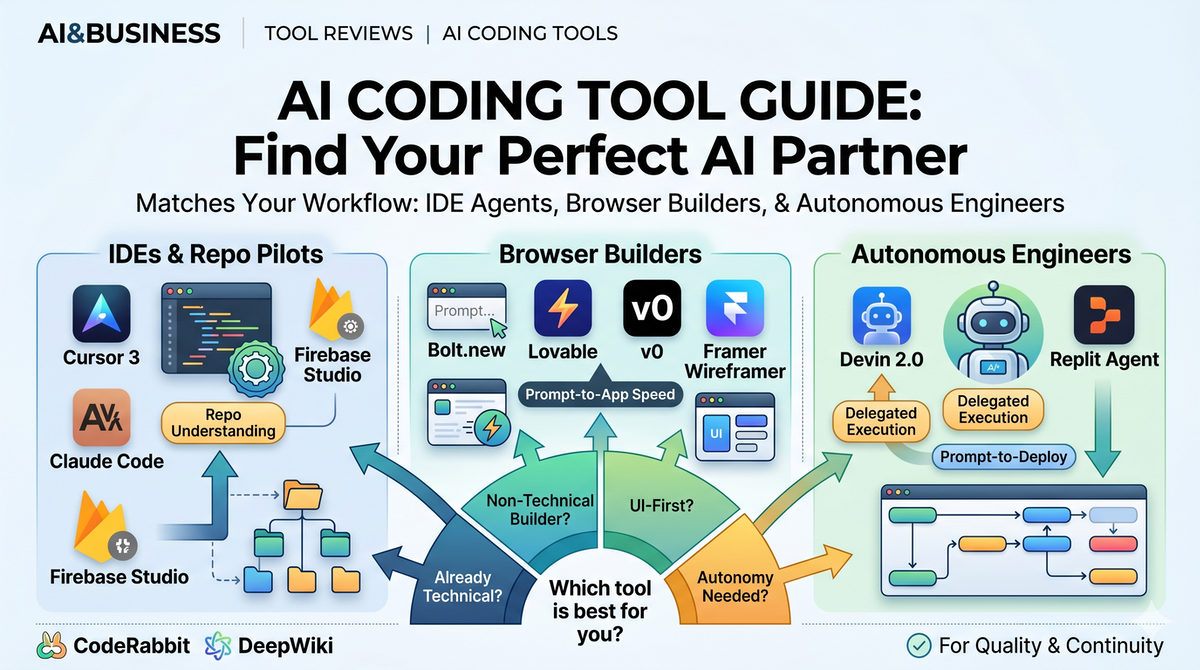
AI coding tools are no longer one category. Solopreneurs now choose between four working surfaces: agentic IDEs, browser builders, review and documentation copilots, and autonomous software engineers.
Quick take
- Already technical? Start with Claude Code + Cursor 3.
- Non-technical but shipping fast? Start with Bolt.new or Lovable.
- UI-first and front-end heavy? Use v0 or Framer Wireframer.
- Need an autonomous builder for bounded work? Evaluate Devin 2.0 or Replit Agent.
At-a-glance comparison
| Tool | Best for | Strength | Watch-out | Starting point |
|---|---|---|---|---|
| Cursor 3 | Developers and technical founders | Best IDE workflow plus model flexibility | Still works best when you can review outputs | $20/mo |
| Claude Code | Engineers working inside real codebases | Deep repo understanding and direct file editing | Usage-based cost requires more monitoring | Usage-based |
| OpenAI Codex | ChatGPT users who want a fast coding surface | Fast iteration and mid-task steering | Less IDE-native than Cursor or Claude Code | ChatGPT Plus |
| Firebase Studio | Builders leaning into the Google stack | Fast full-stack prototyping | Best fit if you already like Firebase workflows | Varies |
| Bolt.new | Non-technical founders and rapid prototypes | Prompt-to-app speed in the browser | Less control than an IDE workflow | Varies |
| Lovable | Builders or solo founders who want polished app output | Strong app-builder experience from natural language | Still needs product judgment and cleanup | Varies |
| v0 | Front-end builders and UI prototyping | Very fast React and Next.js interface generation | Better for UI and scaffolding than whole products | Varies |
| Devin 2.0 | Autonomous multi-step engineering tasks | Handles longer project arcs than typical copilots | Needs tight scope and review loops | Premium |
| Replit Agent | Founders who want one prompt to deployable app | Database, code, and deployment in one flow | Quality varies with app complexity | Varies |
How to choose in 30 seconds
The key question is not "Which tool is best?" but "Where do I want the AI to sit in my workflow?"
A February 2026 survey of 906 software engineers found Claude Code was the most-used AI coding tool with a 46% "most loved" rating.
- Inside my editor: choose Cursor 3 or Claude Code.
- In the browser, from prompt to prototype: choose Bolt.new, Lovable, or Replit Agent.
- For UI-heavy iteration: choose v0 or Framer Wireframer.
- For autonomous execution on larger scopes: choose Devin 2.0.
Agentic development platforms
Best for: Developers, technical founders, and vibe coders who want the flexibility to switch models without leaving the IDE.
- Why it stands out: Cursor 3 introduced a more agent-first workflow and keeps the strongest model menu in the category.
- Workflow fit: Excellent when you want AI to live inside a real coding environment rather than a browser toy.
- Watch-outs: You still need taste and technical judgment; Cursor makes strong developers faster, but it does not replace review.
- Editorial take: One of the best default choices for serious solopreneurs building real products.
Best for: Builders working in existing codebases who care about depth, context, and direct file-level work.
- Why it stands out: Terminal-native, deep codebase understanding, Git-friendly, and strong at working through multi-file changes.
- Workflow fit: Great for technical solo founders who already think in repos, shells, and commits.
- Watch-outs: Usage-based pricing means you need to watch cost on large sessions.
- Editorial take: The strongest "serious work" option when accuracy and codebase context matter more than glossy UI.
Best for: ChatGPT users who want a fast AI coding surface and low friction to start.
- Why it stands out: GPT-5.3-Codex is fast, feels lightweight, and supports more active steering while you work.
- Workflow fit: Useful when you want coding acceleration without committing to a full IDE migration.
- Watch-outs: It is less editor-native than Cursor or Claude Code for long-running implementation work.
- Editorial take: Strong for speed and accessibility; best when you already live inside ChatGPT.
Best for: Full-stack prototyping with Google services and a managed backend path.
- Why it stands out: Tight ecosystem fit for builders already leaning on Firebase products.
- Workflow fit: Good for founders who want to get from concept to app quickly with backend primitives close at hand.
- Watch-outs: The fit is strongest when your stack is already compatible with Google's product logic.
- Editorial take: Worth considering if your business already wants the Google lane, not necessarily the universal default.
Best for: Builders curious about an agent-driven IDE workflow centered on Gemini.
- Why it stands out: Frames development as planning, coding, testing, and verification executed by autonomous agents.
- Workflow fit: Strong if you want to experiment with Google's vision of AI-native development rather than traditional editor assistance.
- Watch-outs: Still a more opinionated workflow shift than simply adding AI to an existing editor.
- Editorial take: Interesting strategic product, especially if you believe the future is agent-managed engineering.
Browser builders and front-end tools
| Tool | Best for | What it does well | Notes |
|---|---|---|---|
| Bolt.new | Non-technical founders and rapid MVPs | Prompt, run, edit, and deploy in one browser loop | Great first step when speed matters more than architecture purity |
| Lovable | Builders who want cleaner app output from natural language | Produces polished app experiences quickly | Best when the goal is a product-feeling prototype, not low-level control |
| v0 by Vercel | Front-end teams and solo UI builders | Generates React and Next.js UI quickly | Excellent for landing pages, components, and interface iteration |
| Framer Wireframer | Design-led site and layout generation | Turns prompts into responsive page structures | Best for shaping information design before implementation |
For many solopreneurs, these tools are not replacements for an IDE. They are speed layers for discovery, prototyping, and front-end iteration.
Review, documentation, and support tools
Code review
CodeRabbit helps when your bottleneck is no longer code generation but code judgment. It is most useful once you are shipping collaborative or higher-risk code changes and want AI to act more like a reviewer than a writer.
Documentation
DeepWiki is valuable because solo builders often lose time re-understanding their own repos. Turning a codebase into an explorable wiki is a leverage move, not a vanity move.
"The value of AI coding tools is not just writing code faster. It is reducing the number of times a solo builder has to context-switch, re-explain, or re-learn their own system."
Autonomous software engineers
Devin 2.0
Devin sits in a different category from standard coding copilots. The promise is not just assistance but delegated execution across longer engineering tasks.
Kiro (AWS)
Amazon's entry matters because it signals that autonomous engineering agents are becoming a permanent category, not an experimental edge case.
Replit Agent
Replit Agent is compelling for founders who want the shortest path from prompt to deployed web app, especially when they do not want to stitch together hosting, database setup, and code generation manually.
Recommended stacks by builder type
If you have never coded before
- Start with Bolt.new or Lovable.
- Use v0 when you want to improve the UI layer.
- Add CodeRabbit later, only once you are shipping code you need to review.
If you already build software
- Start with Claude Code or Cursor 3.
- Add v0 for interface work.
- Use DeepWiki when the repo starts getting large enough to forget your own architecture.
If you want maximum autonomy
- Evaluate Devin 2.0 or Replit Agent for bounded projects.
- Keep a human review loop. The more autonomy you ask for, the more important scope and verification become.
Editorial verdict
The winning move is usually not choosing one universal winner. It is matching the interface to the stage of work:
- IDE agents for production software
- Browser builders for first versions and fast iteration
- Review and documentation tools for quality and continuity
- Autonomous agents for tightly scoped delegated execution
That is how a solopreneur turns AI from a novelty into real operating leverage.